Loading... Please wait...

(e.g. the Plantronics headset microphone Included with
Dragon® Medical Practice Edition 4
Full Boxed Edition)
(Philips DPM-8000 or the Olympus DS-7000 for example)
(great with Tablet PCs)
Files will download automatically from the USB connected cradle.
Wirelessly Connect to Tablet or Laptop PC
Or Post-Correction (Optional)
 Using Dragon® Medical Practice Edition 4 with a Tablet PC in the exam room
These systems often include an EMR package running on the tablet PC to allow the doctor to speak directly into the text boxes in the patient record. This is much quicker that typing into the EMR form and it improves the quantity and quality of documentation for the patient visit. If an EMR is not being used then the doctor can use his/her voice to call up an exam form template and speak into each of the desired fields. This is quick and easy for the doctor, allowing for more patient visits during the work day. Also documentation is already entered so no end of the day paperwork is necessary. Some points about this system:
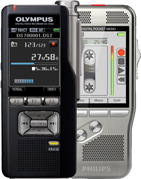 Using Dragon® Medical Practice Edition 4's ability to transcribe audio files
Often doctors and other medical professionals want to speak into a digital recorder like those from Olympus or Philips. The files saved on these digital recorders can then be transcribed using Dragon® Medical Practice Edition 4 into a text document. The state of the art software that comes with Olympus or Philips professional digital recorders has built-in compatibility with Dragon® Medical Practice Edition 4. The user can simply select the file they want transcribed and push a button on a toolbar and the software will convert the file format for Dragon® Medical Practice Edition 4 and Dragon® Medical Practice Edition 4 will transcribe the document. Then final editing can be done either natively in Dragon® Medical Practice Edition 4 or for foot pedal support; one can use Transcription Made Easy to do the final editing.
 Automating Common Repetitive Tasks with Dragon® Medical Practice Edition 4
There are many tasks that we do repetitively throughout the day on our computers. These tasks can be time consuming. And since the time spent on these tasks takes away the time spent on other things anything that reduces the time to perform the tasks is a return on the investment of Dragon® Medical Practice Edition 4.

 What are the specialized vocabularies available in Dragon® Medical Practice Edition 4?
For a downloadable, this pdf document contains the Dragon® Medical Practice Edition 4 vocabularies: Specialty Vocabularies
The Nuance verbiage is as follows: Dragon® Medical Practice Edition 4 is licensed on a "per individual" basis. You are permitted to install the software on more than one computer (such as on a desktop and a laptop computer, or on a work and a home computer), but you cannot use the software concurrently on more than one computer. You are permitted to create multiple voice profiles, so long as each voice profile is for you. If someone else wants to create a voice profile, that person must purchase a separate Dragon® Medical Practice Edition 4 license.
 Can I use Dragon® Medical Practice Edition 4 with my EMR package?
Out of the box Dragon® Medical Practice Edition 4 will work properly with virtually all Windows application edit boxes. The best way to think about it is if you can set your cursor in an edit box and type into it, you will be able to use Dragon® Medical Practice Edition 4. In addition, several EMR packages have additional macros and commands that allow you to use Dragon® Medical Practice Edition 4 in ways specialized for their packages. Dragon® Medical Practice Edition 4 supports virtually all EMR handlers on the market. Dragon® Medical Practice Edition 4 supports over 150 EMR programs, see the official list. Even if your EMR is not on the list, it is designed to work with any computer and any program, including your EMR.